

Venue taxonomy
Understand the venue type, zone type and aisles of a device, how the levels build on each other and how audiences use them for targeting.
What it’s for
The venue type says what kind of place a screen is in. It comes from the OpenOOH venue taxonomy, the industry’s standard list of places where screens are. The list goes from broad to specific, for example Retail › Grocery › Aisles › Bakery.
Inventory Managers set the venue type on each device. Booking Managers then use it in an audience, under Open OOH, to reach only the screens in the places they want, for example all screens at the check-out.
In short
- The taxonomy has up to four levels: Parent, Child, Grandchild and Aisle.
- You set it on the device, not on the location, with Venue type, Zone type and Aisles.
- Zone type exists only for Retail - Grocery and Retail - Mall. Aisles exist only for the grocery zone Aisles.
- In an audience, a pick includes everything below it.
- A device without a venue type doesn’t match any Open OOH selection.
The four levels
| Level | Example | Field in the device form |
|---|---|---|
| Parent | Retail | Venue type, the first part of the option Retail - Grocery |
| Child | Grocery | Venue type, the second part of the option Retail - Grocery |
| Grandchild | Aisles | Zone type |
| Aisle | Bakery | Aisles |
Each level is optional and needs the level above it. A device can have only a venue type, or a venue type and a zone type, or all three.
The venue type belongs to the device
One store can have a screen at the entrance, one at the check-out and one in the bakery aisle. That’s why you set the venue type, the zone type and the aisles on each device, not on its location.
The values you can choose
Venue type
The device form offers the 20 venue types of the parent Retail. Each option starts with ‘Retail -’:
Fueling station, Convenience store, Grocery, Liquor store, Mall, Cannabis dispensary, Pharmacy, Parking garage, Furniture, Apparel, Automotive, Laundromat, Vape shop, Mass merchandising, Consumer electronic, Other, Sporting good, Pet store, Office supply and Home renovation.
Zone type
Zone type says where in the venue the screen is. The field appears only for two venue types:
| Venue type | Zone types |
|---|---|
| Retail - Grocery | Entrance, Check out, Aisles, Exterior |
| Retail - Mall | Concourse, Food court, Spectacular |
Aisles
Aisles says which product aisles the screen is in. The field appears only when the venue type is Retail - Grocery and the zone type is Aisles. You can select several of the 24 aisles:
Alcohol, Baby, Bakery, Baking, Beverages, Bread, Breakfast, Butcher, Butter, Canned, Cheese, Condiments, Dairy, Deli, Frozen, Grains, Household cleaning, Meat, Pasta, Personal care, Pet, Produce, Seafood and Snack.
How audiences use it
In an audience, a Devices condition has the field Open OOH. It shows the taxonomy in four columns: Parent, Child, Grandchild and Aisle. It shows all parents of the taxonomy, for example Transit, Retail and Outdoor. You can also use the search to find a place by its name or its number.
| You pick | Example | Devices that match |
|---|---|---|
| A parent | Retail | Every device with a venue type of this parent. |
| A child | Retail › Grocery | Every device with this venue type, with any zone type or none. |
| A grandchild | Retail › Grocery › Check out | Only devices with this venue type and this zone type. |
| An aisle | Retail › Grocery › Aisles › Bakery | Only grocery devices that have this aisle selected. |
- Several picks are joined by OR. A device has to match only one of them. If you pick Bakery and Dairy, a device with one of the two aisles is enough.
- A pick includes everything below it. Retail › Grocery also matches a device in Retail › Grocery › Aisles › Bakery.
- No venue type, no match. A device without a venue type is not in an audience that has an Open OOH selection.
- No selection, no limit. If you leave Open OOH empty, the venue type doesn’t limit the audience.
- Devices with a location sensor are different. Such a device reports where it is each time it asks for an ad. It plays your ad only while it is in a place you selected. See Targeting conditions.
How to use it
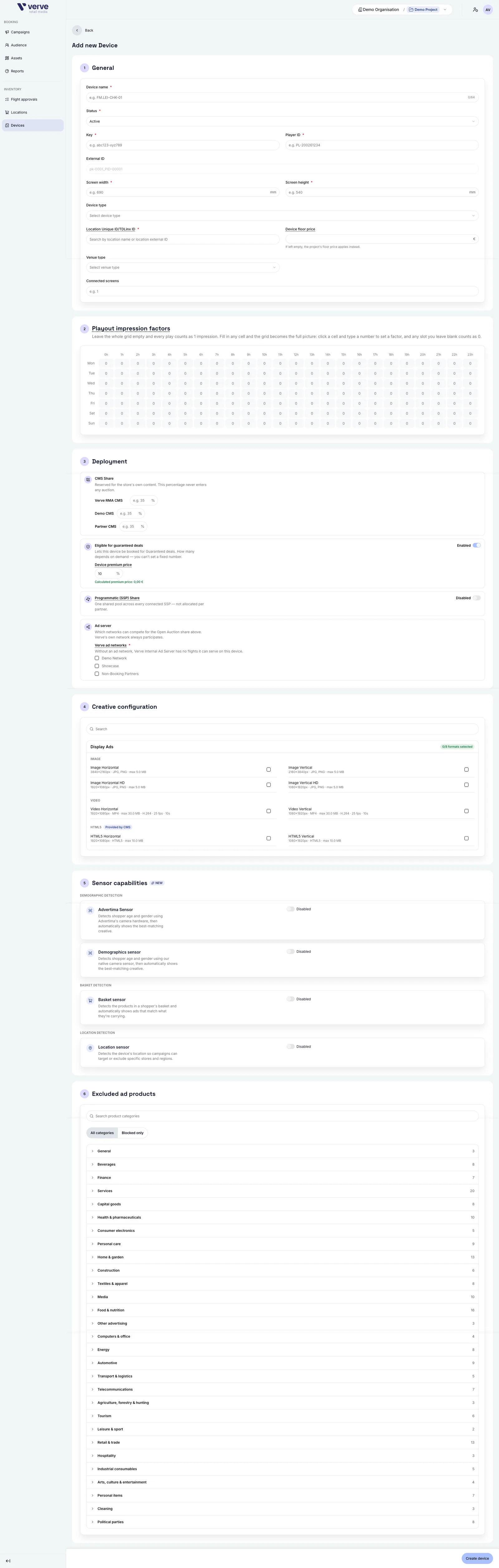
You set the venue type in the device form, in the General section, when you create or edit a device under Inventory › Devices. The guide Create a device shows the whole form.
- 1In Venue type, choose the kind of place, for example Retail - Grocery.
 1
After you choose Retail - Grocery or Retail - Mall, the field Zone type appears next to it. Choose the zone. If you choose the grocery zone Aisles, the field Aisles appears below. Select all aisles the screen is in. Then save the device.
The device’s page shows your choice under Venue type, Zone type and Aisle.
Fields and rules
| Field | Required | Rule |
|---|---|---|
| Venue type | No | One of the 20 Retail venue types. |
| Zone type | No | Only for Retail - Grocery and Retail - Mall. One zone per device. |
| Aisles | No | Only for Retail - Grocery with the zone type Aisles. One or more aisles. |
- A new venue type clears the rest. When you change Venue type, the zone type and the aisles are removed. Choose them again.
- A new zone type clears the aisles. When you change Zone type from Aisles to another zone, the selected aisles are removed.
- Set it for every device you want to be found. The field is optional, but a device without a venue type is left out of every audience that uses Open OOH.
- Be as specific as you can. A device with a zone type still matches a broader pick like Retail › Grocery. A device with only a venue type doesn’t match a pick for a zone or an aisle.
Related
- Glossary: Venue type, Device, Location, Audience, Sensor
- How-to guides: Create a device, Build an audience
- Feature pages: Targeting conditions, Location unique ID
- For developers: Venue, zones and aisles