

Device floor price
Set the minimum price for one playout on a device, and understand how it works with the project floor price and the premium for guaranteed flights.
What it’s for
The device floor price is the lowest price at which one playout on a device is sold. A flight that pays less than this for a playout doesn’t play on the device. As the device owner, you use it to protect the value of your screens, for example with a higher floor price for a screen in a busy place.
You don’t have to set a floor price on every device. A device without its own floor price uses the project floor price, which is the default for all devices in the project.
In short
- The floor price is an amount in € per playout.
- It is the same for all deal types. For guaranteed flights, the Device premium price is added on top.
- If you leave Device floor price empty, the Project floor price applies.
- A device needs one of the two. If the project has no floor price, you have to enter one on the device.
Which floor price applies
| Device floor price | Project floor price | What applies to the device |
|---|---|---|
| Filled in | Filled in or empty | The device floor price |
| Empty | Filled in | The project floor price |
| Empty | Empty | You can’t save the device. The form asks you to enter a floor price. |
A device floor price of 0 counts as empty: the project floor price applies.
How a flight is compared with the floor price
The floor price is a price per playout. The RMP always compares it with what a flight pays for one playout on this device.
| The flight pays | What is compared with the floor price |
|---|---|
| Per playout (CPP) | The cost per playout of the flight |
| Per 1,000 impressions (CPM), non-guaranteed flights only | The CPM, times the playout impression factor of the device, divided by 1,000 |
Example: your device has a floor price of €0.02. A CPP flight with a cost per playout of €0.03 can play on it. A CPM flight that pays €8.00 per 1,000 impressions, at an hour with a factor of 2, pays 8.00 × 2 ÷ 1,000 = €0.016 for the playout. That is below the floor price, so it doesn’t play in this hour.
- A flight below the floor price doesn’t play. This is true for non-guaranteed flights and for programmatic (SSP) demand.
- A factor of 0 never reaches the floor price. At an hour with a playout impression factor of 0, a CPM flight pays nothing for a playout, so it is below every floor price.
- The store’s own content has no price. Content that comes from the CMS of the device is not compared with the floor price.
Guaranteed flights: floor price plus premium
A guaranteed flight reserves time on your device in advance. For this, you can ask for more than the floor price. The Device premium price is a percentage that is added on top of the floor price. The result is the minimum price per playout for guaranteed flights on this device.
Example: the floor price is €0.50 and the Device premium price is 10%. A guaranteed flight has to pay at least 0.50 × 1.10 = €0.55 per playout. The form shows this amount under the field as ‘Calculated premium price’.
- A new device starts with 10%. You can change the percentage, also to 0. With 0, the minimum for guaranteed flights is the floor price itself.
- The premium is for guaranteed flights only. Non-guaranteed flights and programmatic demand are compared with the floor price alone.
- A device that is too expensive is left out. A guaranteed flight that pays less than the minimum of your device doesn’t reserve time on it. In the flight form, the Capacity check tells the booker when the cost per playout is below what the screens sell for.
- A reserved flight keeps its price. If you raise the floor price later, a guaranteed flight that has already reserved time on the device keeps playing at the price it was booked with.
How to use it
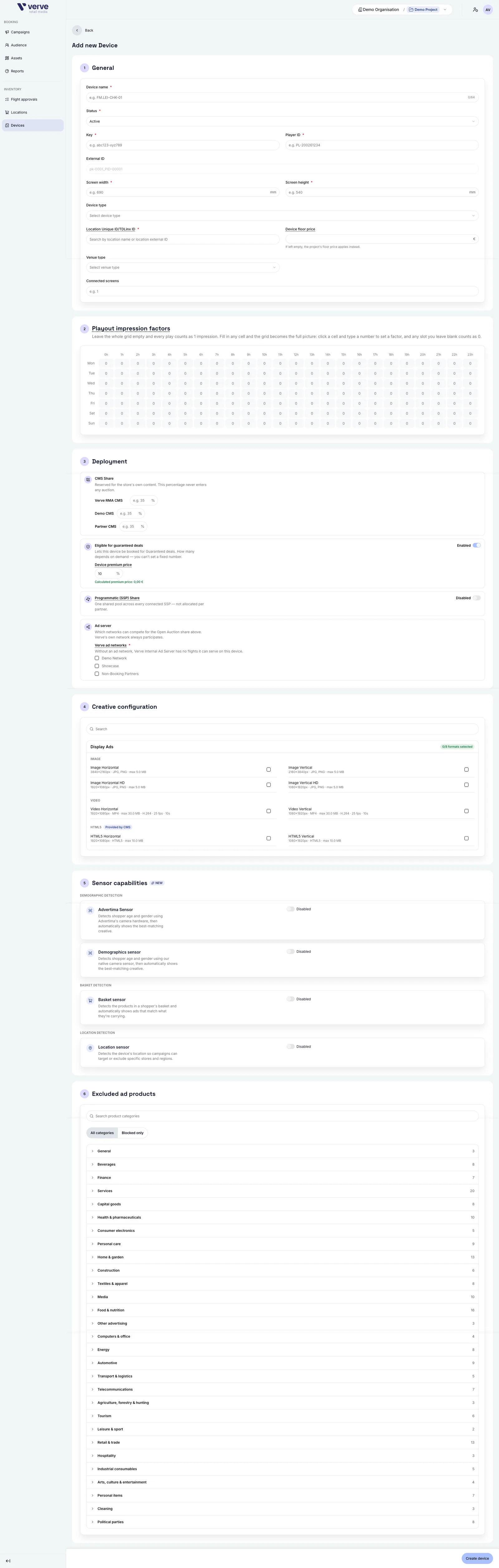
You set the floor price in the device form. Go to Inventory › Devices and click Add device, or open a device and click Edit device.
- 1In the section General, enter the amount in Device floor price, in € per playout. The form shows the same price per 1,000 playouts under the field. Leave the field empty to use the project floor price.
- 2In the section Deployment, check Eligible for guaranteed deals. If it is Enabled, enter the percentage in Device premium price.
- 3Click Create device, or Save device when you edit.
 123
The device’s page shows the Device floor price under General, and the Device premium price under Deployment.
You set the default for the whole project under Project settings › Settings, in Project floor price. See Project settings: floor price.
Fields and rules
| Field | Required | Rule |
|---|---|---|
| Device floor price | Only if the project has no floor price | An amount of 0 or more, in € per playout. Decimals are allowed. Example: 0.02. |
| Eligible for guaranteed deals | No | Enabled or Disabled. If it is Disabled, guaranteed flights can’t book the device, and the premium field is hidden. |
| Device premium price | Yes, if the device is eligible for guaranteed deals | A whole percentage of 0 or more. Example: 10. |
| Project floor price | No | An amount of 0 or more, in € per playout. It applies to every device in the project without its own floor price. |
- The floor price is per playout, not per screen. A device with several connected screens has one floor price.
- The device comes first. A device floor price always replaces the project floor price, also when it is lower.
- A missing floor price blocks saving. Without a device floor price and without a project floor price, the form shows ‘Enter a floor price — this project has no default to fall back on’. This also applies when you edit an older device.
- A high floor price can mean fewer playouts. Flights that pay less don’t play on the device.
Related
- Glossary: Project floor price, Device, Playout, CPP, CPM, Guaranteed
- How-to guides: Create a device, Understand organisations and projects, Book a guaranteed flight
- Feature pages: Playout impression factor