

Playout impression factor
Tell the RMP how many people see one playout on a device, by day and hour, and understand how this turns playouts into impressions.
What it’s for
A playout is one time an ad appears on a screen. An impression is one person who saw it. The playout impression factor connects the two: it says how many people typically see one playout on this device. A factor of 3 means that one playout counts as about 3 impressions.
A store is busier at some times than at others. So you don’t enter one number for the device. You enter a factor for each hour of each weekday, in a grid in the device form.
In short
- The grid has one cell for each hour of each weekday. Each cell holds the factor for this hour.
- An empty grid means that every playout counts as 1 impression.
- As soon as you fill in one cell, the grid is the full picture: every cell you leave empty counts as 0.
- The RMP uses the factor to count impressions, and to price flights that pay per 1,000 impressions (CPM).
How the grid works
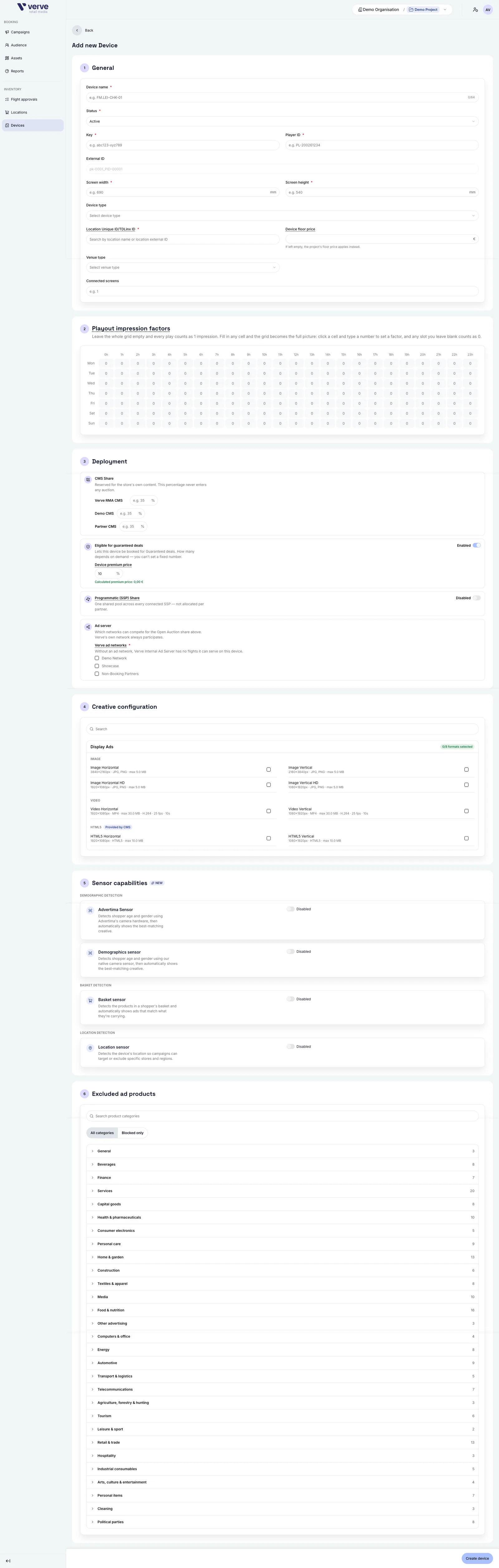
The grid has seven rows, Mon to Sun, and 24 columns, 0h to 23h. The cell Mon / 9h holds the factor for playouts on Mondays from 9:00 to 10:00.
| What you enter | What a playout counts as |
|---|---|
| Nothing in the whole grid | 1 impression, at every hour |
| A number in a cell | This number of impressions, for playouts in this hour |
| Nothing in a cell, while other cells are filled | 0 impressions, for playouts in this hour |
| 0 in a cell | 0 impressions, for playouts in this hour |
Fill in every hour that counts
If you fill in only the busy hours, all other hours count as 0. A playout in such an hour brings no impressions. Enter a factor for every hour in which people can see the screen, not only for the busy ones.
The hours are in the local time of the store. The RMP uses the time zone of the device’s location.
What the RMP uses it for
Counting impressions
Each playout counts the factor of the hour in which it plays. A playout on Monday at 9:30 with a factor of 4 counts as 4 impressions. The impressions of a flight are the sum over all its playouts.
Pricing CPM flights
A CPM flight pays per 1,000 impressions, but a device sells playouts. Only non-guaranteed flights can use CPM. With the factor, the RMP works out what one playout is worth: the CPM, times the factor, divided by 1,000.
Example: a flight pays €8.00 per 1,000 impressions. At an hour with a factor of 4, one playout is worth 8.00 × 4 ÷ 1,000 = €0.032. At an hour with a factor of 0, the playout is worth nothing.
The RMP compares this amount with the floor price of the device. A higher factor makes a playout on your device worth more to a CPM flight. A CPP flight pays a fixed price per playout, so the factor doesn’t change what it pays.
Guaranteed flights
A guaranteed flight is always priced per playout (CPP). In the flight form, you can’t select Cost per mille (CPM) for a guaranteed flight. CPM is only for non-guaranteed flights.
- The factor doesn’t change the booking. A guaranteed flight reserves playouts and pays a fixed price for each one. The factor changes neither the number of playouts nor the price.
- The factor still counts impressions. Each playout of a guaranteed flight counts the factor of the hour in which it plays.
How to use it
You enter the factors in the device form. Go to Inventory › Devices and click Add device, or open a device and click Edit device. The grid is in the section Playout impression factors.
- 1Click a cell and type the factor for this weekday and hour. You can use decimals, for example 3.5. Fill in every hour in which people can see the screen. To remove a factor, empty the cell.
- 2Click Create device, or Save device when you edit.
 12
The device’s page shows the factors under Playout impression factors as a coloured grid, ‘Average expected impressions by day and hour’. The colour of a cell shows its factor, on a scale from 0 to 8+. Hover over a cell to see its value. A device with an empty grid shows ‘No impression factors selected’.
Fields and rules
| Field | Required | Rule |
|---|---|---|
| A cell in Playout impression factors | No | A number of 0 or more. Decimals are allowed. Example: 3.5. |
- The grid is optional. If you leave it empty, every playout counts as 1 impression.
- One factor per hour. The form works in full hours. You can’t enter a factor for part of an hour.
- It’s your own estimate. As the device owner, you know how many people pass the screen. The RMP doesn’t measure the factor for you.
- The hours follow the location. The RMP reads the grid in the Timezone of the device’s location.
- The factor isn’t the opening hours. You set the opening hours on the location. Don’t use 0 in the grid to say that the store is closed.
- Each device has its own grid. Two devices in the same store can have different factors, for example one at the entrance and one at the checkout.
Related
- Glossary: Playout impression factor, Impression, Playout, CPM
- How-to guides: Create a device, Book a guaranteed flight, Read your reports
- Feature pages: Device floor price
- For developers: Playout impression multiplier