

Ad formats and asset specs
Understand what an ad format is, what the RMP reads from your file, and when an asset fits the devices of your flight.
What it’s for
An asset is an image or video file that plays on screen. An ad format is the description of a file that a device can play: its size in pixels, its file type and, for a video, its length. Devices have different screens, so they accept different ad formats.
The RMP uses ad formats to bring the two together. It reads the details of each asset you upload, and it knows which ad formats each device accepts. In a flight, it offers you only the assets that fit the devices of your audience, so an ad never plays stretched, cut off or not at all.
In short
- You can upload an asset of any size. The spec matters when you add the asset to a flight.
- A flight shows one slot for each ad format that the devices of your audience accept.
- An asset fits a slot only when it matches the ad format exactly: size, file type, and for a video also codec, frame rate and length.
- A device plays your flight only if you filled a slot for an ad format that it accepts.
What the RMP reads from your file
You don’t enter the spec of an asset. When you upload a file, the RMP reads it from the file itself. You see the result in the Assets list and, in full, under Extracted information when you open the asset.
| Detail | Image | Video |
|---|---|---|
| Type | Yes | Yes |
| File size | Yes | Yes |
| Dimensions, with the orientation Square, Horizontal or Vertical | Yes | Yes |
| Duration | No. An image has no length of its own. | Yes |
| Frame rate, Frame count, Bitrate and Codec | No | Yes |
The upload form lists the supported file formats. You upload images as JPG or PNG and videos as MP4.
When an asset fits an ad format
An asset fits an ad format when every point of the format agrees with the file. There is no tolerance and no automatic conversion: the RMP doesn’t resize, crop or shorten your file.
| Point | Rule | Applies to |
|---|---|---|
| Size in pixels | Exactly one of the sizes of the format, for example 1920x1080px. The same shape in another size doesn’t fit. | Images and videos |
| File type | One of the file types of the format, for example MP4. An image never fits a video format, and a video never fits an image format. | Images and videos |
| File size | Not bigger than the maximum of the format, if it has one. | Images and videos |
| Codec | The codec of the format, for example H.264. | Videos |
| Frame rate | The frame rate of the format, for example 25 fps. | Videos |
| Length | Exactly the length of the format. A video of 9.96 seconds doesn’t fit a format of 10 seconds. | Videos |
An image plays as long as the format says
An image has no length, so the ad format sets it. The slot tells you, for example: ‘In this format, your creative plays for 10 seconds.’
How to use it
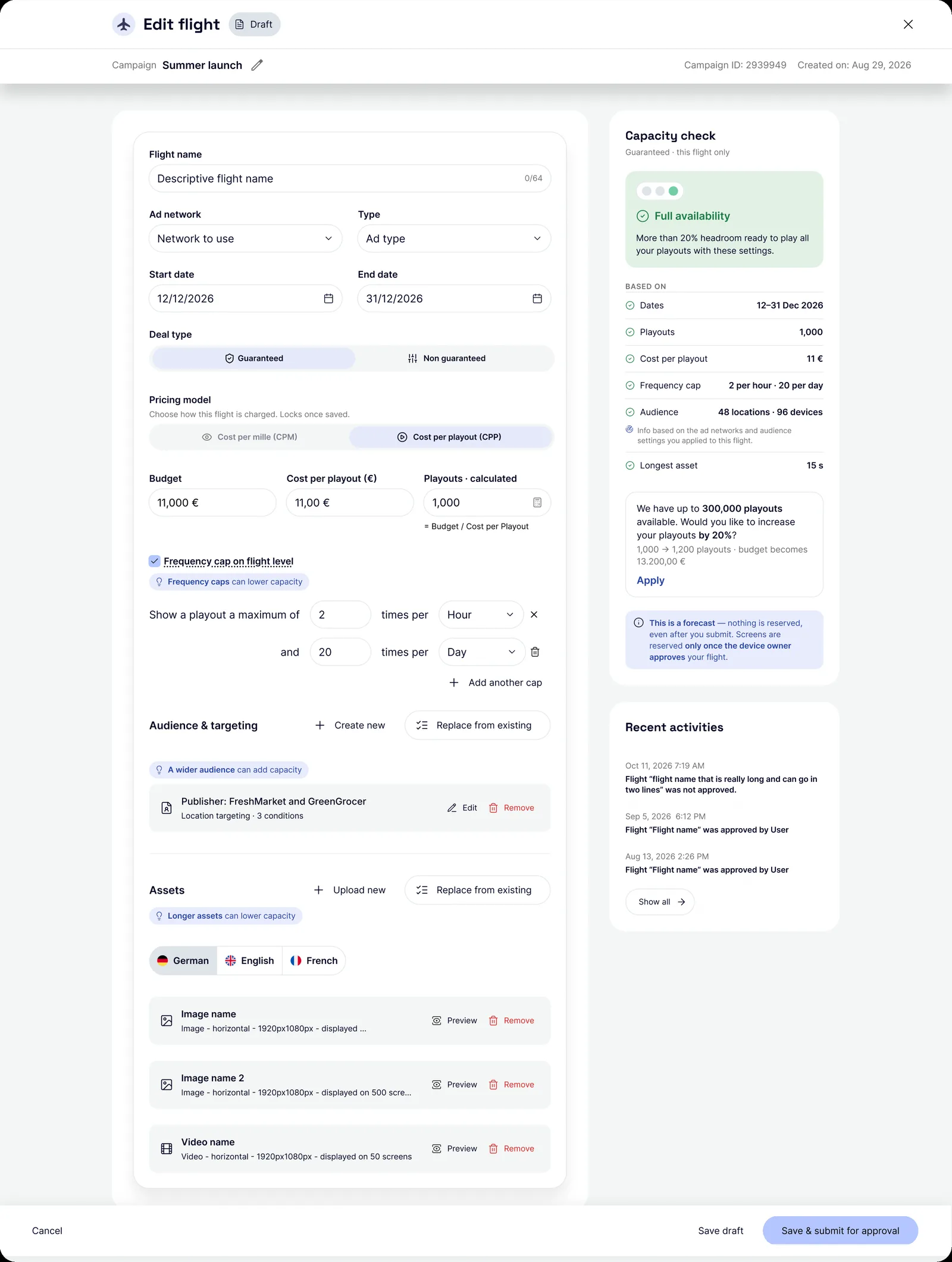
You add assets in the Assets section of the flight form. The section fills in after you select an Ad network and an audience, because these decide which devices the flight reaches.
- 1Choose the language. Each language has its own slots. See Asset languages.
- 2The section shows one slot for each ad format. Each slot shows the spec of its format. Click Select image or Select Video in a slot, pick an asset and click Choose. The list only shows assets that fit this format.
- 3Use Preview to check an asset, or Remove to empty the slot.
- 4For a guaranteed flight, the Capacity check shows the Longest asset. The longest asset of the flight sets the length of a playout, so longer assets can lower capacity.
 1234
Fields and rules
- A flight needs at least one asset. You don’t have to fill every slot.
- An empty slot means fewer devices. Devices that only accept ad formats you left empty don’t play your flight. Fill more slots to reach more of your audience.
- One asset per slot. To play several assets, fill several slots. See Asset rotation.
- You can reuse an asset. The same asset can be in several flights.
- No fitting asset? The list says ‘No assets match the ad format’. Upload a file in the spec that the slot shows, then select it.
- No slots at all? ‘No bookable ad formats for this audience’s devices’ means that the devices of your audience accept no ad format that you can book. Change the audience.
- Some content comes from the CMS. HTML5 formats are delivered by the CMS of the device owner. You can’t upload or select an asset for them.
- Assets lock when you submit. You can change the assets while the flight is a draft. A submitted flight keeps each asset as it is at that moment, also if you edit the asset later.
Related
- Glossary: Asset, Device, Capacity
- How-to guides: Upload an asset, Create a device, Book a guaranteed flight
- Feature pages: Asset rotation, Asset languages
- For developers: Creative formats