

Frequency cap
Limit how often one device plays your ad, and understand what is counted, which periods roll and when the count starts again.
What it’s for
A frequency cap is the maximum number of times one device may play your ad in a period, for example 2 times per hour and 20 times per day. It stops the same device from repeating your ad too often, and spreads your budget over more devices and more time.
The cap works per device, not per screen. A device is the media player in a store, and it can have several screens connected to it. Those screens share one count.
It’s a limit, not a schedule. Your ad can play less often than the cap, but not more often.
In short
- Every finished playout of your flight on a device adds 1 to that device’s count.
- Minute, 30 Minutes and Hour are rolling periods: they always look back from now.
- Day, Week and Overall Flight Duration are fixed periods: they follow the calendar, or the whole flight.
- You set the cap in the flight form, with Frequency cap on flight level.
What is counted
The count goes up by 1 each time your ad plays to the end on a device. That is one playout.
- Playouts are counted, not impressions. One playout seen by five people is 1 for the cap. This is the same for CPP and CPM flights.
- A play that doesn’t finish isn’t counted. If the ad can’t load, or the device stops it before the end, the count stays the same.
- Each device has its own count. A cap of 2 per hour on 100 devices allows up to 200 playouts per hour in total. A busy device doesn’t use up the allowance of another one.
- The count is for the whole flight. If your flight has three assets, all three add to the same count. Three assets don’t give you three times the cap.
- Each flight has its own count. Two flights in the same campaign don’t share a cap.
A playout is counted shortly after it finishes: within about a minute for Minute, 30 Minutes and Hour, and within a few minutes for Day, Week and Overall Flight Duration. In rare cases, a device can therefore play your ad once more than the cap before the count catches up.
Rolling and fixed periods
You choose one of six periods for each cap. They don’t all count time the same way.
Rolling periods: Minute, 30 Minutes, Hour
A rolling period always looks back from the current moment. Hour means the last 60 minutes, not ‘since 10:00’. There’s no moment when the count goes back to zero. Each playout leaves the count by itself when it gets too old.
Example: your cap is 2 per Hour. A device plays your ad at 10:05 and at 10:40. It can’t play it again at 11:00, because both playouts are still less than 60 minutes old. At 11:05, the first playout is 60 minutes old and stops counting, so the device can play your ad once more.
Fixed periods: Day, Week, Overall Flight Duration
A fixed period follows the calendar. All playouts in the period count until the period ends. Then the count starts again from zero for every device at the same moment.
Example: your cap is 20 per Day. A device that reaches 20 playouts at 15:00 can’t play your ad again that day. At midnight the count starts again, and the device can play it up to 20 more times.
Day and Week use UTC
The day starts at midnight UTC, and the week starts on Monday at midnight UTC. In Germany, that is 01:00 in winter and 02:00 in summer. The day of your cap is therefore not exactly the same as the opening day of a store.
Overall Flight Duration counts every playout from the first day of the flight to the last. This count never starts again.
When an old playout stops counting
| Period | Type | What is counted | A playout stops counting |
|---|---|---|---|
| Minute | Rolling | The last 60 seconds | 60 seconds after it played |
| 30 Minutes | Rolling | The last 30 minutes | 30 minutes after it played |
| Hour | Rolling | The last 60 minutes | 60 minutes after it played |
| Day | Fixed | The current calendar day, in UTC | At the next midnight UTC. This is between a moment and 24 hours after it played. |
| Week | Fixed | The current calendar week, Monday to Sunday, in UTC | On the next Monday at midnight UTC. This is between a moment and 7 days after it played. |
| Overall Flight Duration | Fixed | The whole flight | Never |
The Hour count is refreshed about once a minute, so a playout can still count for up to a minute after it is 60 minutes old.
How to set it up
You set the frequency cap in the flight form, when you create a flight or edit a draft. It works the same way for guaranteed and non-guaranteed flights. A frequency cap is optional: without one, a device can play your ad as often as the flight allows.
- 1Select Frequency cap on flight level.
- 2After Show a playout a maximum of, enter the Number of playouts. Use a whole number greater than 0.
- 3After times per, choose the period in Frequency: Minute, 30 Minutes, Hour, Day, Week or Overall Flight Duration.
- 4To add a second limit, click Add another cap. You can use each period once, so a flight can have up to six caps.
- 5For a guaranteed flight, the Capacity check shows your caps in the Frequency cap row and takes them into account.
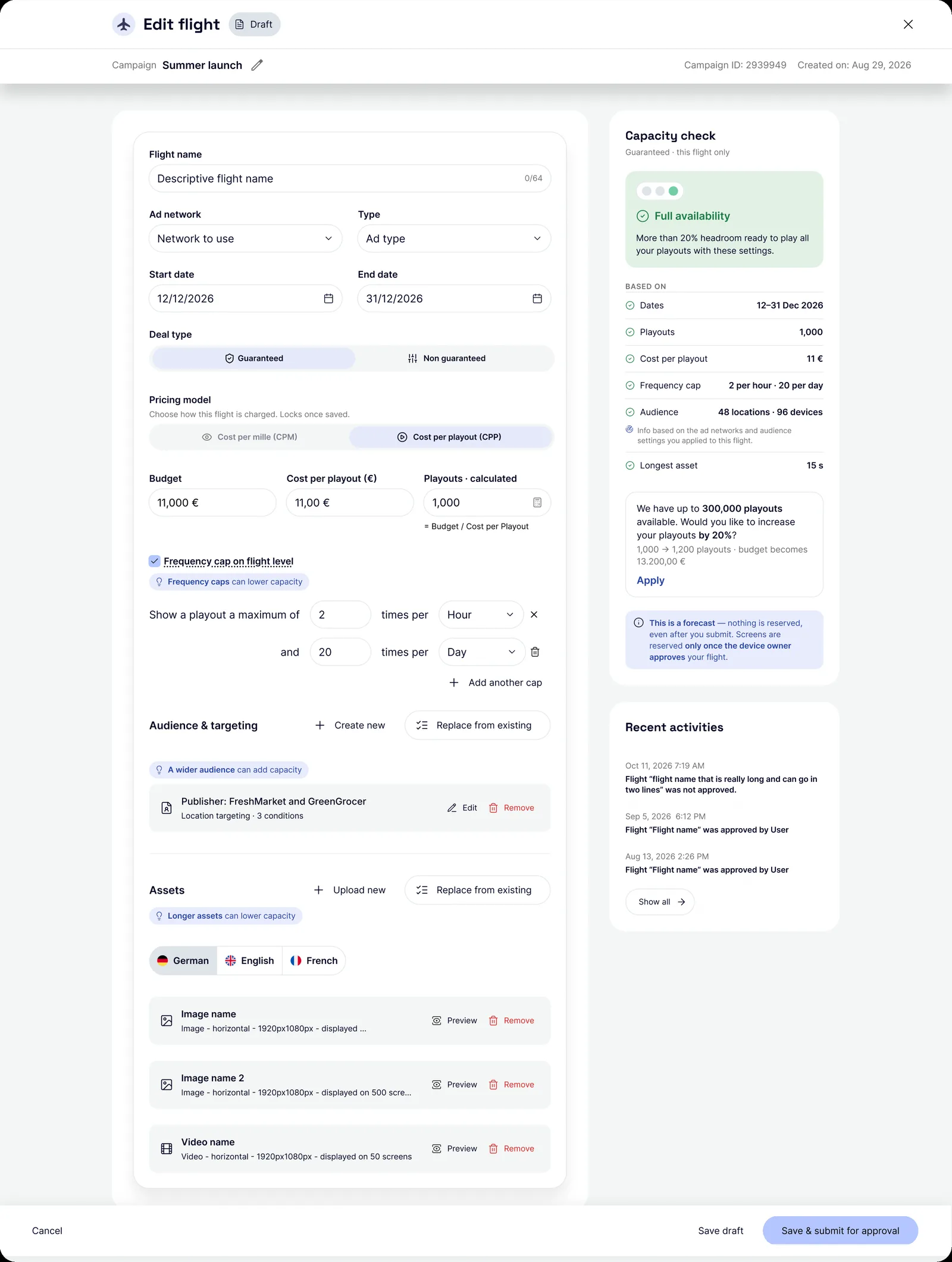 12345
Click Save draft or Save & submit for approval to store the caps with the flight. To remove a cap, click the × or the bin icon at the end of its row.
Fields and rules
| Field | Required | Rule |
|---|---|---|
| Frequency cap on flight level | No | Turns the caps on for this flight. |
| Number | Yes, for each cap | A whole number greater than 0. Example: 2. |
| Frequency | Yes, for each cap | One of the six periods. Each period can be used once per flight. |
- All caps apply together. With 2 per Hour and 20 per Day, a device plays your ad only while it is under both limits.
- Stricter caps can lower capacity. For a guaranteed flight, a strict cap means more devices are needed to deliver the same number of playouts. Check the capacity check after you change a cap.
- Caps lock when you submit. You can change the caps while the flight is a draft. After you submit the flight for approval, the fields are locked.
- Approvers see your caps. The flight shows them as, for example, ‘Max 2 playouts per hour · Max 20 playouts per day’.
Related
- Glossary: Frequency cap, Playout, Impression, Capacity
- How-to guides: Book a guaranteed flight, Book a non-guaranteed flight
- For developers: Enforcing frequency caps offline