

Change request reasons
Understand the reasons a partner can give when it declines a flight and asks for changes, what the booker sees, and what to do next.
What it’s for
A partner who doesn’t want a flight on its devices as it is clicks Decline and request changes. The partner then has to give a reason. The reason tells the booker what to change, so that the flight can be approved the next time.
A change request is the decision of one partner. It keeps the flight off the devices of this partner only. See Distribution approvals for how partners decide.
In short
- There are three reasons: Incorrect targeting, Budget exceeds limit and Other.
- With Other, the partner writes the reason in its own words.
- The booker sees the reason in the flight, with the name of the partner.
- To make the changes, the booker withdraws the flight, edits it and submits it again. All partners then decide again.
The reasons
| Reason | What the booker sees |
|---|---|
| Incorrect targeting | The text ‘Incorrect targeting’. |
| Budget exceeds limit | The text ‘Budget exceeds limit’. |
| Other | The text the partner wrote in the Other field. |
- A reason is required. The Request changes button works only after the partner has selected a reason.
- Other needs a text. With Other, the partner has to answer ‘What is the reason for the change request?’ before the button works.
- One reason per request. If more than one thing has to change, choose Other and name all of them.
What happens after a change request
| For | What happens |
|---|---|
| The partner who asked | The flight doesn’t play on this partner’s devices. If it played there before, it stops. The flight moves to the Changes requested tab under Inventory › Flight approvals. |
| Other partners | Nothing changes. The flight keeps playing on the devices of partners who approved it, and partners who haven’t decided can still decide. |
| The booker | A red flag is shown next to the flight status, and the flight shows the reason. |
A change request doesn’t change the flight. The flight stays locked and as it was submitted, until the booker withdraws it.
What the booker sees
- A red flag next to the flight status. Hold the mouse over the flag to read ‘A partner has requested changes’. A flight that is live with another partner stays Live. Any other flight shows In review.
- The decision of each partner. Click the status to open Distribution approvals from partners. The partner who asked for changes is marked with a flag.
- The reason, in the flight. Open the flight. A message at the top says ‘Changes requested by’ with the name of the partner, followed by the reason and ‘You can resolve the problem and submit again for an approval.’
- One message per partner. If several partners asked for changes, you see the reason of each one.
How to use it
As an approver: request changes
- 1Open Inventory › Flight approvals and click Review on the flight.
- 2Click Decline and request changes. The dialog Request changes on the flight opens.
- 3Click Select your reason and choose a Reason.
- 4If you chose Other, write what has to change.
- 5Click Request changes.
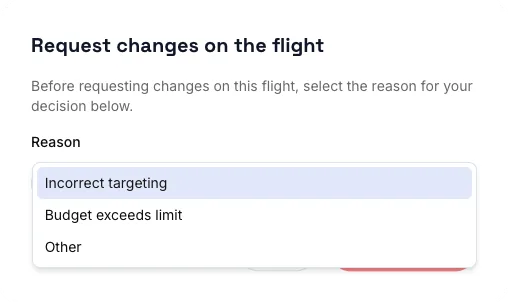
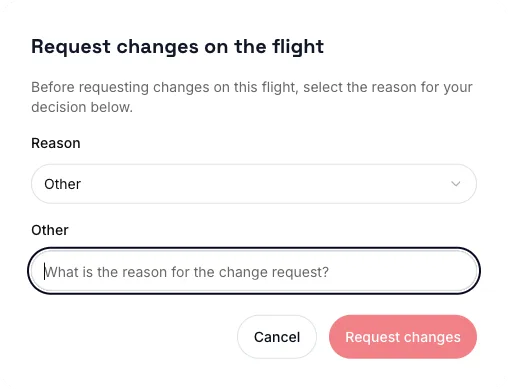
After this, the flight shows You have requested changes. with your reason. You can still click Approve later if you change your mind, without a new submission.
As a booker: make the changes
- 1Open the flight under Booking › Campaigns and read the reason at the top.
- 2Click Withdraw approval to Edit and confirm with Yes. The flight goes back to Draft.
- 3Make the changes. For Incorrect targeting, check the audience of the flight. For Budget exceeds limit, check the budget.
- 4Click Save & submit for approval.
Withdrawing stops the flight everywhere
When you withdraw a flight, it stops playing on all devices, also on the devices of partners who had approved it. After you submit it again, all partners have to approve it again. If the flight is live with other partners, decide first if the change is worth this pause.
Fields and rules
| Field | Required | Rule |
|---|---|---|
| Reason | Yes | One of Incorrect targeting, Budget exceeds limit or Other. |
| Other | Yes, if the reason is Other | A short text that says what has to change. The booker sees it exactly as you write it. |
- The reason is shown with the partner’s name. The booker sees which partner asked for changes. Other partners don’t see the name.
- The reason belongs to one round. When the booker withdraws the flight or submits it again, the old decisions and reasons no longer count.
- A change request can be taken back. The partner who asked can approve the flight later, as long as the flight isn’t withdrawn, completed or terminated. The flight then plays on this partner’s devices.
- You can’t answer a reason in the platform. If a reason isn’t clear, contact the partner directly.
Related
- Glossary: Flight approval, Flight Approver, Partner, Flight status
- How-to guides: Approve a flight, Book a guaranteed flight, Book a non-guaranteed flight
- Feature pages: Distribution approvals, Targeting conditions